 Guilda Work
Today
Open in Guilda WorkYour day at a glance: what is next, what is urgent and the assistant.
Updated on
Today is Guilda Work's home screen (menu Today). It gathers on one page what you need to look at now.
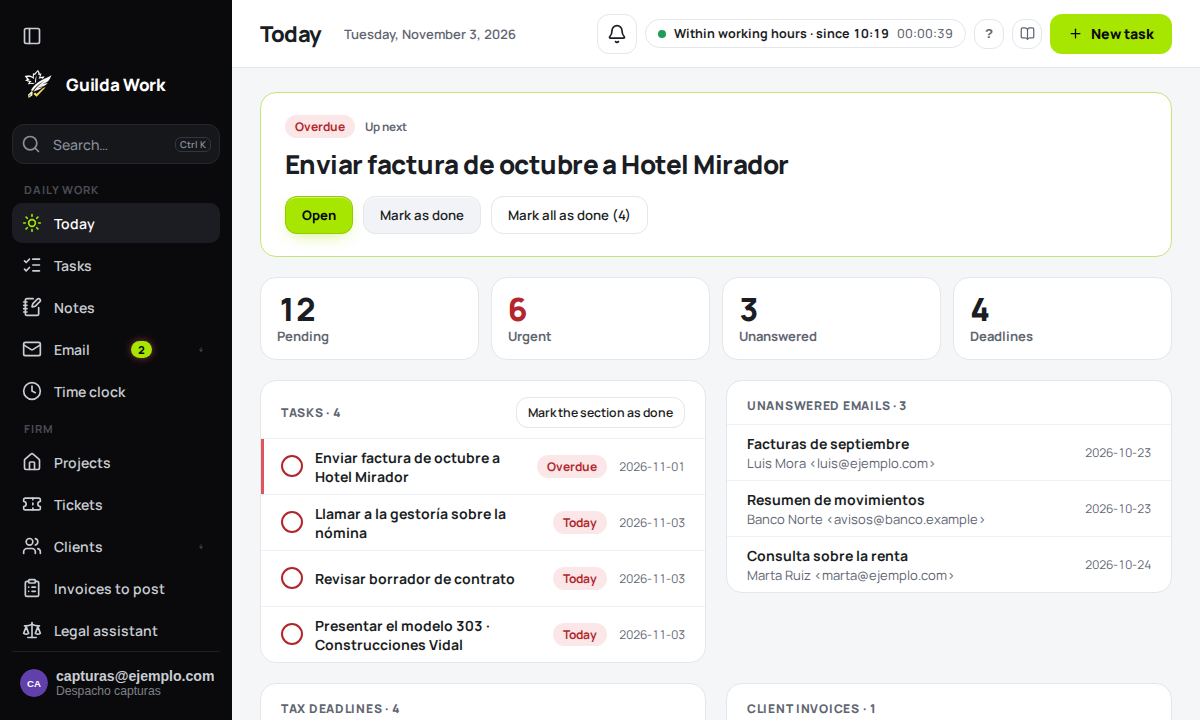
Up next
The large card at the top is Up next: the most urgent task, with its status (for example Overdue). From there you can Open the task, Mark as done, or Mark all as done if there are several similar ones.
The figures
Four counters: Pending, Urgent, Unanswered (emails waiting for your reply) and upcoming tax Deadlines.
The lists
- Tasks: what is due or in progress. Tick the circle to complete one, or use Mark the section as done.
- Unanswered emails: received messages you have not replied to yet. Automatic ones do not count.
- Tax deadlines: the forms coming up, with their date.
Certificates about to expire
If you manage the office's electronic certificates, Today adds the Certificates about to expire list: those that have already expired and those that expire in the next 30 days. Each one shows how many days are left, which client it belongs to, what services it is used for (tax filing, notifications mailbox, signing) and where its renewal stands. Those expiring within a week or less appear as urgent.
Below it, Filings at risk because of the certificate warns about deadlines that will arrive with the certificate already expired and no other valid one to replace it. More on how they are registered and renewed in Digital certificates.
The assistant
On the right, Your day in brief sums up in a sentence what you have. Below, under Try asking, there are shortcuts such as "Summarise my day" or "What is due this week?", and a box to ask anything. Press the expand icon to open the AI Assistant full screen.
Create something quickly
The New task button in the top bar takes you straight to adding one. If nothing is pending today, the screen says so.