 Guilda Work
Absences and holidays
Open in Guilda WorkRequest holidays and leave, check your balance and approve your team's requests.
Updated on
Under Time clock → Absences you request time off, see how many days you have left and follow the status of each request. Whoever manages the office's time clock approves or rejects them.
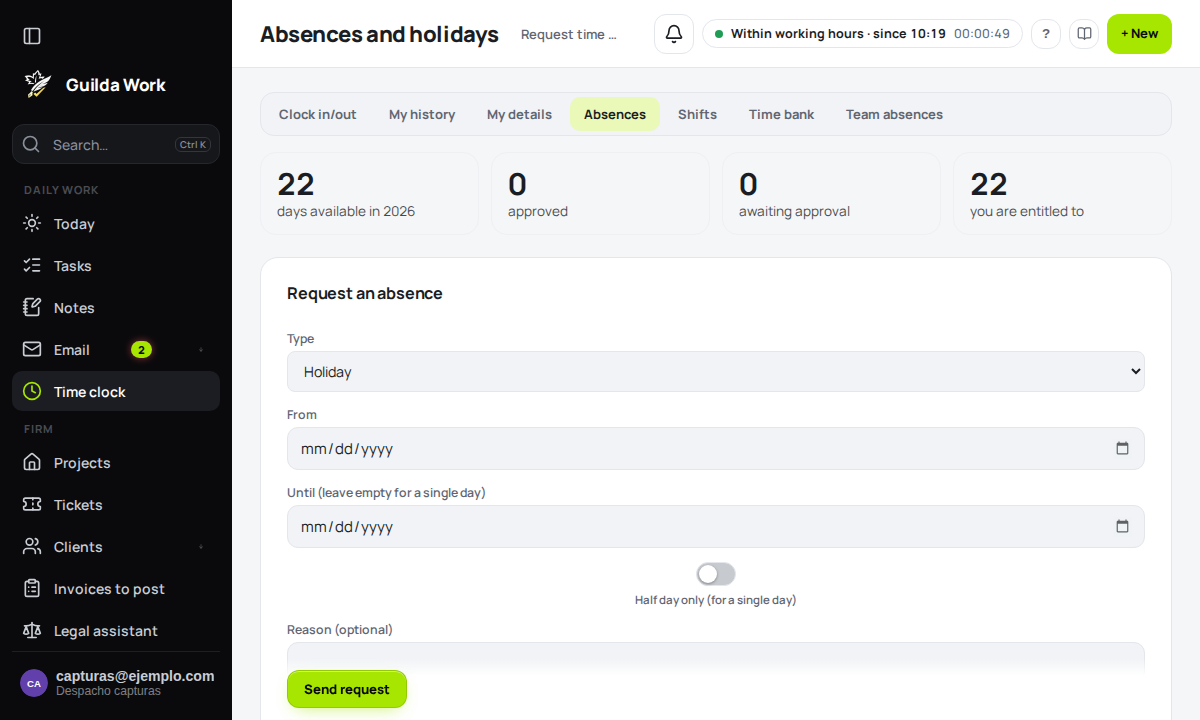
Requesting an absence
Choose the type (holiday, personal days, paid leave, sick leave or other), the dates and, if you like, a reason. A single day can be requested as a half day.
- Only working days count: weekends, national public holidays and any holidays your office has added are not deducted.
- You cannot request days that overlap another pending or approved absence of yours.
- A request cannot span two years: make it in two parts.
When you send it, whoever manages the time clock gets a notice in the bell and on their phone. When they resolve it, you get a notice too, with their comment if there is one.
Your holiday balance
At the top you see the days available, approved, awaiting approval and the ones you are entitled to that year. Only holidays use up your balance; leave, personal days and sick leave are recorded but do not deduct days. Pending requests already count, so you cannot request the same days twice.
The default is 22 days a year; the office can change it, and whoever manages can set different days for a particular person.
Cancelling
You can cancel a pending or approved absence as long as it has not ended. If it was already approved, the manager is notified.
If you manage the time clock
With the time clock manager permission (or as an office supervisor) you have Team absences:
- Out today: who is away today.
- Awaiting approval: approve or reject each request, with an optional comment. When approving a holiday, the system checks the person has enough balance.
- Upcoming approved absences, which you can cancel.
- Holiday balance for each person, with the default annual days and a per-person adjustment.
- Record an absence for someone else (for example, sick leave): it is approved straight away and they are notified.
Approving or recording an absence removes any shifts the person had on those days, and those hours are not expected in their time bank.
From the phone and the assistant
The app has its own absences screen (umbrella icon in the time clock) to request, cancel and, if you manage, approve. The AI assistant can also request them, check your balance and, for managers, approve or reject (it always asks for confirmation before acting).