 Guilda Work
Settings centre
Open in Guilda WorkEverything configurable, in one place with search.
Updated on
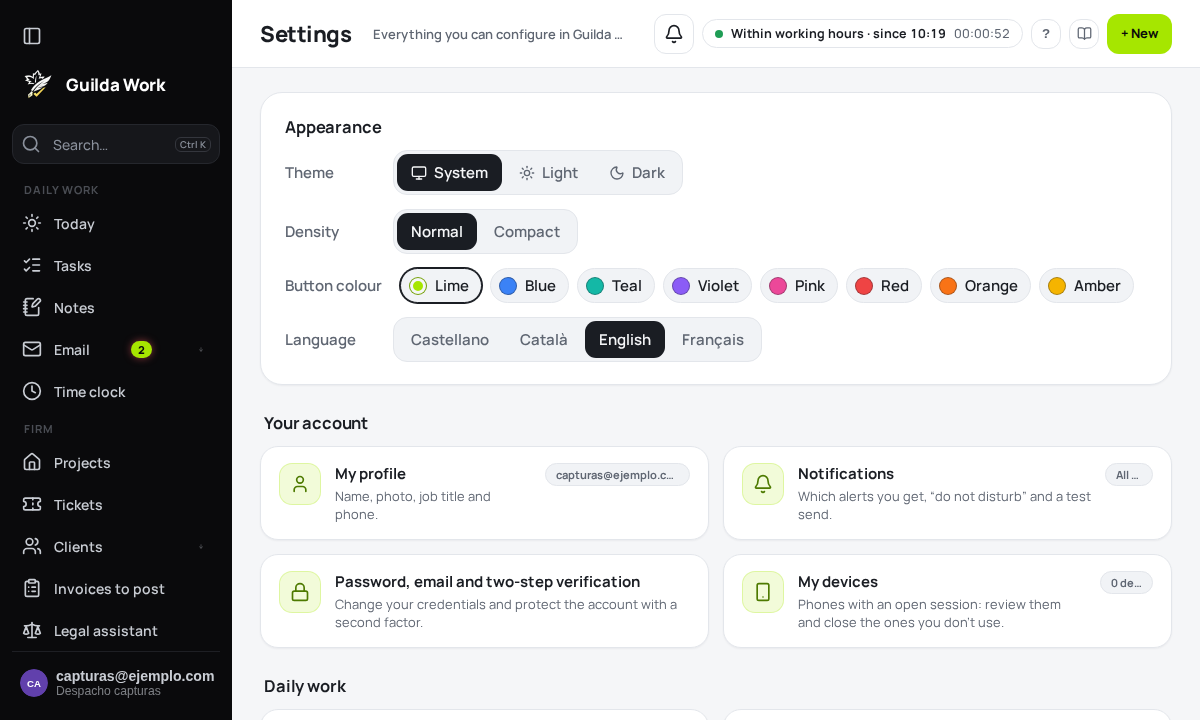
Settings (cogwheel panel → All settings) gathers everything you can configure in Guilda Work.
What you'll find
- Appearance at the top: theme, density and language, without opening any screen.
- Your account: profile, notifications, password and two-step verification, devices.
- Daily work: mail (signature, rules, templates), mail accounts, task templates, recurring tasks, time-clock details and client reminders.
- AI assistant: model, keys, shortcuts and available models.
- Your data: export, import, recycle bin and connected tools.
Each card shows its current state (for example “2 accounts” or “All on”).
Searching for a setting
Type in the field at the top (“account”, “signature”, “dark”…): the list filters instantly, ignoring case and accents. You only see what you can use; local accounts, for instance, have no password to change.
For your personal data, download or delete it from My data and privacy.
Related guides
Devices and API tokens
Revoke lost phones and create tokens for integrations and scripts.
Platform notices and "view as" mode
What announcements, maintenance and support mode mean.
Browser alerts and alerts without data
Get alerts on your computer even when Guilda Work is not open, and choose to hide their content.